
Search & Scale #112: Consolidation vs. Segmentation: When & Why?
Hey there, 👋
Alex here.
By far, one of the most common errors we see in the account is over-segmentation.
Too many campaigns.
Too many ad groups.
Without a clear reason to do so.
Most people think that more campaigns equal more control. And that will lead to better results.
In most cases? It won’t.
It will just:
● Make it harder for you to understand your data.
● Make Google’s smart bidding less efficient.
At the end of the day, that likely means worse results.
But that doesn’t mean you should never segment your campaigns. That would be very bad advice
So when should you segment your campaigns? And when should you not?
Here’s how we think about that.
Why Consolidation (Usually) Works
The main argument for consolidation is simple: Google’s smart bidding runs on data.
The more data it has, the better it will work for you.
And Google’s machine learning learns at the campaign level. This is the key to smart bidding.
When you split your budget across 10 different campaigns, you’re essentially limiting your smart bidding to learn at 1/10th of the pace.
A rough rule of thumb: each campaign needs around 50 conversions per month so that smart bidding can have enough data to work. Fall below that, and smart bidding will struggle.
Here’s an example.
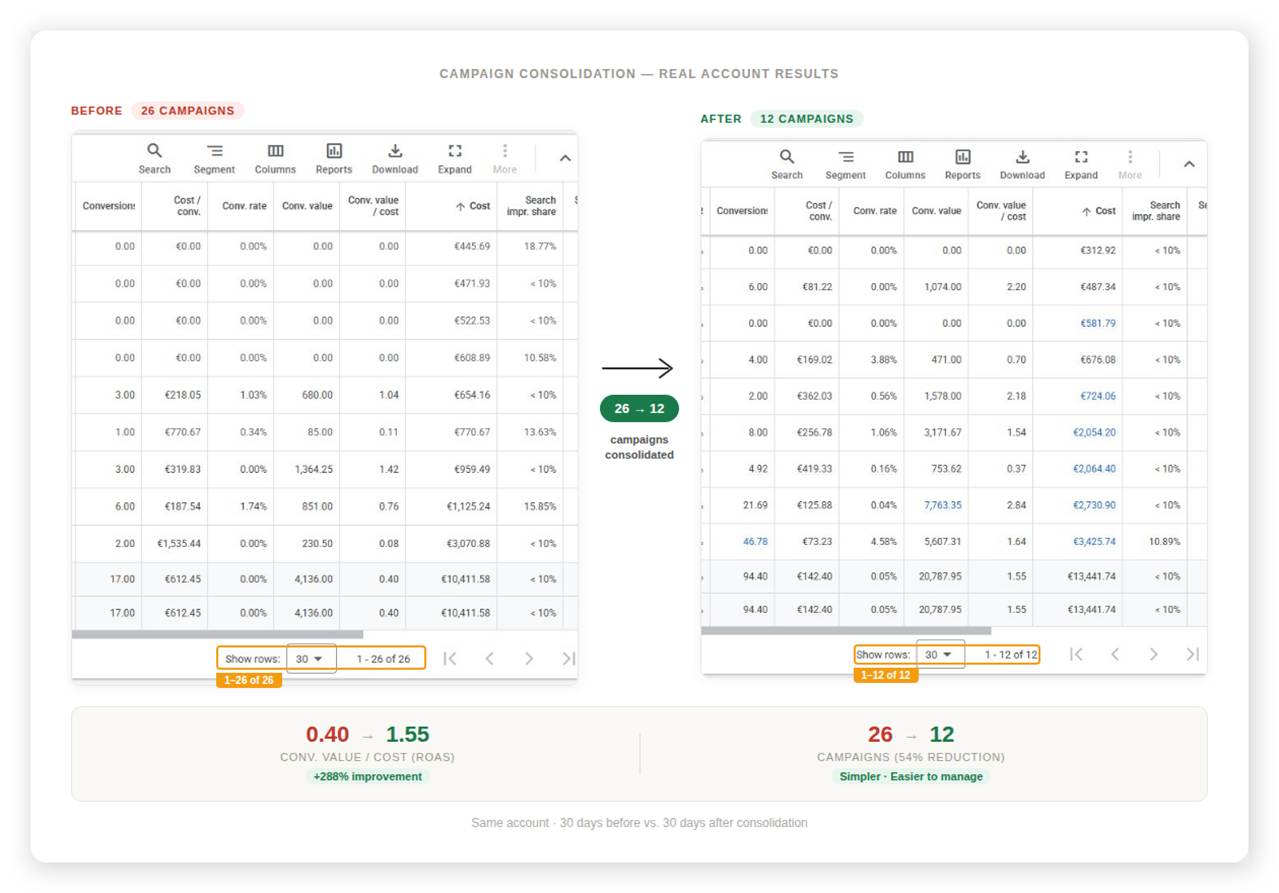
A few months ago, we took over an account that had 26 active campaigns at the time. The account was failing badly.
Here’s what happened after we consolidated.
See the difference?
That’s a 288% improvement in ROAS in the account simply by consolidating campaigns.
And we’re not done yet. We think we can still bring this down to 4-5 campaigns.
If you can make Google’s machine learning easier, you have half of your job done. To do that, remember to consolidate.
When You Should Segment
With that said, there are (at least) four scenarios where keeping campaigns separate can be the best call.
1. Your Products Have Different Prices or Margins.
Running a $60 product and a $600 product in the same campaign doesn’t make sense
● Their targets are completely different.
● Their conversion windows are different.
● Their margins are different.
When you pool everything together in the same campaign, you’re letting Google figure out which product to push. The problem?
Google doesn’t know your business as you do
And when you set a blended target across both products, it can backfire for a few reasons.
● You may end up with more conversions but less profit.
● Some products may never get delivered because the cheaper ones convert more often.
It’s your job to steer Google in the right direction.
2. Different Performance Across Products
If 10% of your products drive more than 70% of your revenue, then these products deserve their own campaign.
The pushback we hear most often to this is: “But doesn’t Google know which products are the best? Won’t it just push the best ones?”
Yes, but it’s not that simple.
Google knows which products are more likely to convert, and it will naturally spend more on those that convert well.
But here’s the catch.
Google is extremely good at hitting targets. Too good, sometimes.
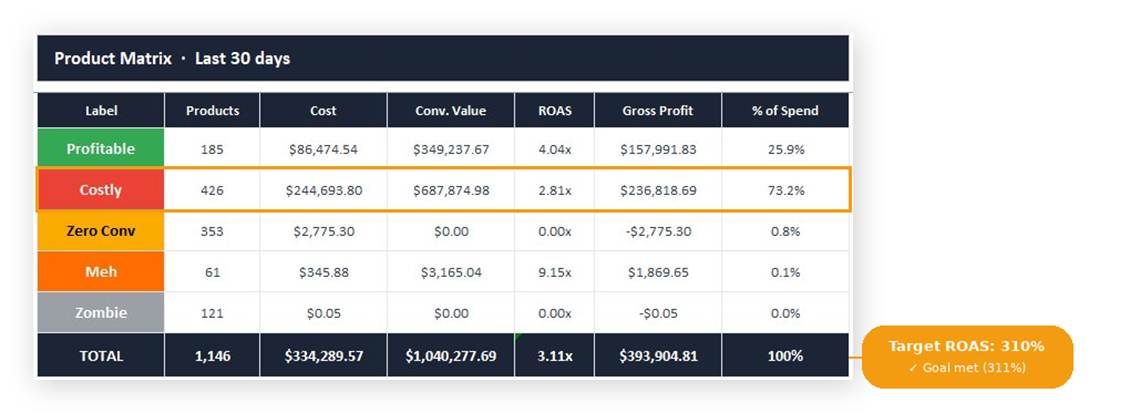
As you can see, Google delivered almost exactly what we asked. But what else can you see?
The “costly” products ate almost 75% of our total budget.
Because we (unintentionally) allowed Google to do so. Since the profitable products exceeded our goals, it gave Google room to try other products.
And this makes it hard for us to set adequate bids.
If we could separate these products in different campaigns, we could either:
● Lower our bids on costly products to decrease our spend.
● Raise budget on profitable products.
That’s how you make your account more efficient.
3. You Need Different Campaign Settings
Sometimes, you want to enable different settings on different campaigns.
● To isolate branded vs. non-branded keywords.
● To bid higher on new customers.
● To target different countries.
In all of these cases, it’s worth considering segmentation.
But once again: only do this when there's a clear reason to do so.
4. You Know Something Google Doesn’t Know (Yet)
Sometimes, you have context that Google’s smart bidding doesn’t have yet.
A new collection about to launch.
An external event that you know will lead to increased demand for one of your products.
Let’s say you work for a brand that’s going to promote one of its products on national TV. You know demand is about to surge.
Segment these products so you’re better prepared once demand hits.
Your Turn
Here’s the question you need to ask yourself before segmenting any campaign:
Do I have a clear, specific reason to separate these campaigns?
If you can’t answer clearly, keep it simple.
Consolidate.
It doesn’t mean you’re being lazy or not making the best decision.
More often than not, segmenting just creates more noise.
So do this: audit your account.
If you have campaigns running with less than 50 conversions per month and no clear reason to separate them, start there.
See you next week,
Alex
When You’re Ready
Free Google Ads Audit → If your eCom brand does $50k+/mo, I’ll personally review your account and send you a step-by-step list on how to fix your account.
Google Ads Audit Checklist → Download your free checklist, pinned on my X bio.
Follow me on X → I share daily insights on scaling with Google Ads: @almeidalexandr