
$17.6M in Revenue in 11 Months Through Strategic Google Ads Restructure
How we helped a lifestyle accessories brand reduce branded keyword dependency, restructure for seasonality, and build a scalable growth framework on Google Ads.
The Challenge
What We Found When We Took Over
On the surface, this account looked like a success. Strong reported ROAS, decent revenue. But the founder wasn't convinced — and he was right.
After an in-depth audit, we discovered that the majority of reported revenue was coming from branded searches — customers already searching for the brand's name. This inflated results and hid true performance from non-branded campaigns.
Most of the Performance Max campaigns weren't excluding branded keywords. We suspected about 60–70% of conversions from these campaigns came from branded queries, making it impossible to measure true incremental growth.
This brand's catalogue is highly seasonal — what's trending in March can flop by April. Yet nearly 70% of the budget was tied up in a single standard shopping campaign with one ad group. Google's smart bidding would eventually adjust, but always with a costly delay.
The Approach
A Framework Built to Scale Long-Term
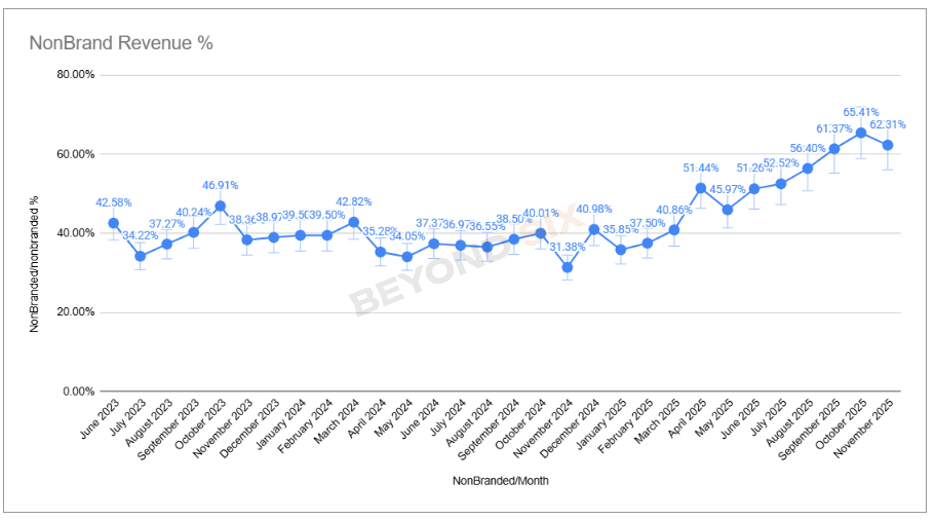
We applied keyword exclusions to all non-branded campaigns so branded queries couldn't inflate results. We then built a dashboard to track the non-branded revenue percentage daily — giving us real-time visibility into true incremental growth.
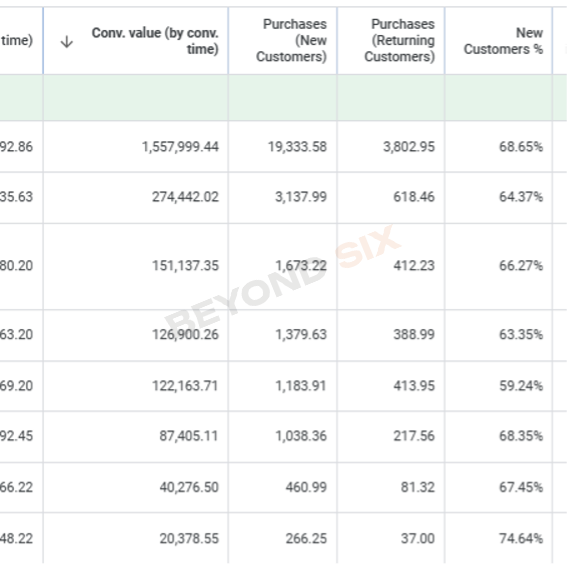
High ROAS from returning customers wasn't the goal. We built a custom column to measure the % of new customers each campaign generated and set this as a secondary KPI alongside ROAS — ensuring the account was driving real business growth, not just repeat purchases.
With products turning over every few weeks, we needed to shift spend proactively. We used custom labels — seller ratings, collection tags, seasonal flags — to segment campaigns and move budget into trending products 3–5 weeks before peak demand, not during it.
We designed a layered structure with differentiated tROAS targets so budget flowed naturally toward the highest-priority campaigns:
- Standard Shopping (tROAS 300–350%) as a profitable catch-all baseline
- Performance Max (tROAS 250–300%) for trending collections with aggressive bidding
- Search campaigns for scaling proven keywords with exact-match control
Account Structure
Clarity, Control, and Flexibility
Every campaign had a defined role. Bidding targets were set deliberately so budget flowed toward the highest-priority campaigns without overlap or cannibalisation.
Captured all direct brand searches. Individual ad groups for different collections and themes. Target Impression Share bidding with a max CPC cap — avoiding the common mistake of applying tROAS or tCPA to branded search.
Dominated SERPs for branded product searches. Required smart bidding (the one exception) with a high tROAS target (+500%) to prevent the campaign from competing on non-branded queries.
Profitable baseline coverage for the full catalogue. Products segmented using custom labels (collections, performance tiers, seasonality flags). Served as the foundation of consistent non-branded revenue.
Once a collection started (or was about to start) trending, it was moved into its own PMax campaign. Deliberately more aggressive tROAS than the catch-all, so Google prioritised these products for budget allocation. Feed-only and full-asset groups tested per campaign.
Built from top-performing terms identified in Shopping. Campaigns broken out by product category, with ad groups segmented by collection. Tight negative keyword management prevented overlap between campaigns.
Introduced in the final months to expand reach with cold audiences. Top-performing assets from Meta and TikTok repurposed for YouTube Shorts, converting at 1.5–1.8x as reported on platform. Used to fill the funnel and drive assisted conversions.
The Results
11 Months. Measurable Impact.
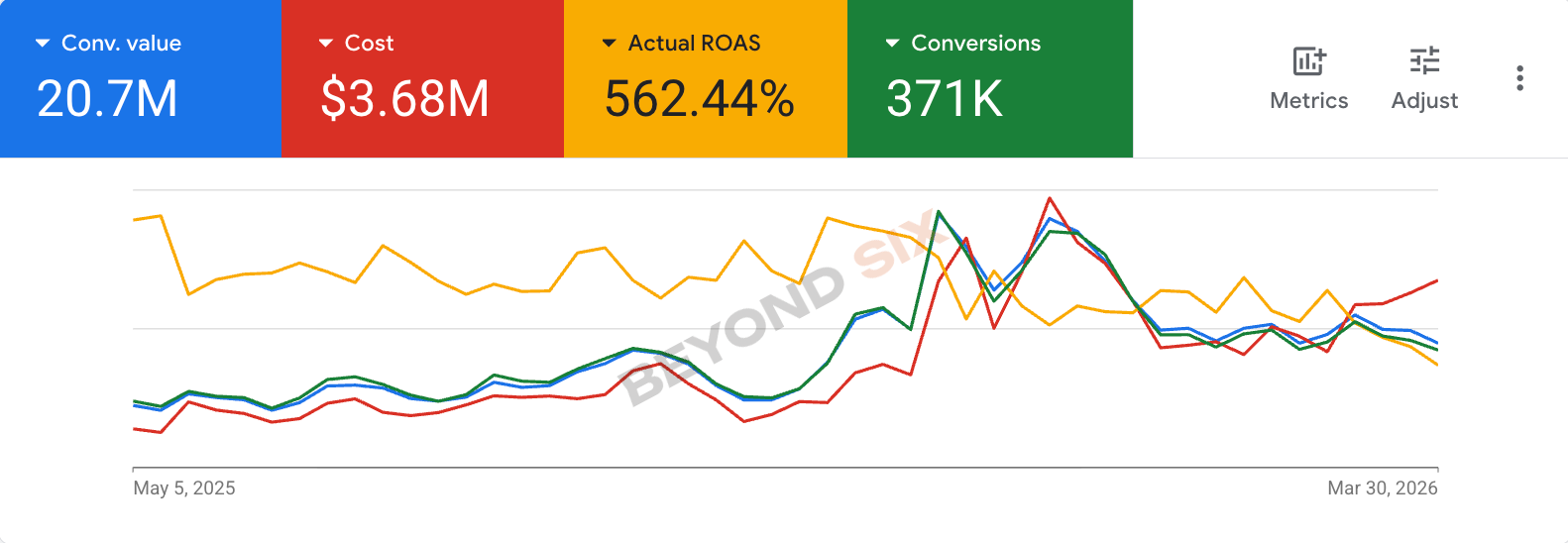
$6.71M increase year-over-year. A 71% lift in Shopify sales compared to the prior 11-month period.
Achieved across all campaigns — branded and non-branded — over the full 11-month engagement.
Nearly doubled the share of revenue coming from non-branded campaigns — the clearest signal of true incremental growth from Google Ads.
Total Shopify revenue increased 71% compared to the same period in the prior year — validating that Google Ads was driving real business growth.
Want results like these?
Let's Look at Your Google Ads Account
If you're an eCommerce brand doing over $50,000/month in revenue and feel like Google Ads could be doing more, let's talk.
100% free. No commitment. No sales pressure.
