
Search & Scale #105: Why Your ROAS Is Lying To You
Hey, Alex here 👋
In this week’s issue, we’re diving into a topic that’s not discussed enough, and it’s one of the main reasons many brands fail with Google Ads.
In short: a high ROAS ≠ a healthy business.
A lot of brands optimize almost exclusively relying on ROAS.
But for some, that's a huge mistake...

Especially for retail brands selling products with different profit margins.
Let me show you why.
Why Your ROAS Is Lying To You
This account perfectly illustrates this problem.
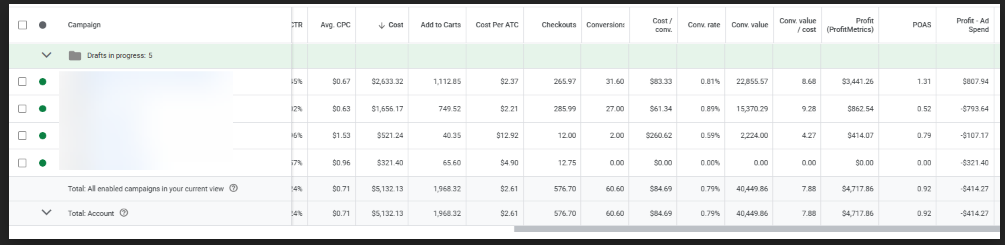
Cost: $5,132.13
Conv. value: $40,449.86
ROAS: 7.88
By most standards, this looks amazing. Who wouldn’t be happy with a 7.88 ROAS?
But here’s the catch 👇
Profit: $4,717.86
Profit (after ad spend): $-414.28
POAS: 0.92
In other words, we lost money — $414.28 in profit while generating $40k+ in revenue.
Can you see how dangerous that is if you’re not careful?
Why POAS Is The Better Metric
Now, before I continue — a quick caveat.
Tracking POAS isn’t relevant for every brand.
If your products have similar COGS, you’ll get limited benefit from it.
But if you’re a retailer selling different brands or products with varying margins, then POAS should be your new north star.
POAS (profit on ad spend) tells you how much money you're actually making and is a much better north star for you to optimize your campaigns.
The example above perfectly illustrates my point.
How To Track POAS
There are two main ways to track POAS instead of ROAS
Use a 3rd party tool (recommended).
Manual installation.
Method 1: Using a 3rd Party Tool
The easiest route is using an external tool Our favorite is Profit Metrics.
It takes only a few minutes to setup — and to top it off, it can actually improve the number of conversions you report.
It’s one of the best investments you can make for accurate profit tracking.
Method 2: Manual Installation
If you don’t want to pay for a tool, you can set it up manually through Google Merchant Center — but it’s technical and complicated.
You'll need to:
Add the [cost_of_goods_sold] attribute to your product feed.
Link Google Merchant Center to Google Ads.
Enable profit reporting with Conversions with Cart Data.
You can read Google's documentation on how to properly send all required parameters HERE.
Make sure your 'Purchase' event includes all required parameters such as merchant ID, product ID, price, COGS, and all other required parameters.
Create a custom column for POAS in Google Ads.
It’s doable, but expect to spend hours, or pay a developer.
That’s why we prefer using Profit Metrics.
Wrapping It Up...
ROAS tells you how much you made.
POAS tells you how much you kept.
If your brand sells products with different profit margins, tracking ROAS alone is like flying blind — you’ll think you’re scaling when you’re actually burning profit.
Switching to POAS tracking gives you clarity.
You’ll finally know which campaigns truly drive profit — and which ones are just vanity metrics in disguise.
Once you make this switch, every optimization you do inside Google Ads will feel smarter, sharper, and grounded in real numbers — not assumptions.
Your Turn
Before you check your next campaign, ask yourself one question:
“Am I optimizing for revenue or profit?”
If it’s revenue — it’s time to level up.
Start tracking POAS this week. Once you see the difference, you won’t go back.
When You’re Ready
Free Google Ads Audit → If your eCom brand does $50k+/mo, I’ll personally review your account and send you a step-by-step list on how to fix your account.
Google Ads Audit Checklist → Download your free checklist, pinned on my X bio.
Follow me on X → I share daily insights on scaling with Google Ads: @almeidalexandr