
Search & Scale #102: The Tracking Fix That Uncovered 13% More Revenue
Hi there, Alex here 👋
Welcome back to Search & Scale — the weekly newsletter for eCommerce founders and marketers who want to scale profitably with Google Ads.
Last week we covered 10 tips for small eCommerce Google Ads accounts.
This week, I want to share a story about something that sounds boring… but can quietly make or break your account: conversion tracking.
In fact, about 70% of the accounts we audit have a basic to intermediate tracking setup. Surprised?
In this week's issue, I'll cover a case study from a new client that (I hope) will be eye-opening for you.
The Problem
A potential client approached us to audit their account and see if there was something that could be done to improve their results.
As usual, one of the very first things we did (and always do) was to double check conversion tracking. Unsurprisingly, things were... lacking.
A basic "Purchase" GACT (Google Ads Conversion Tag) primary conversion installed via Google Tag Manager.
No enhanced conversions enabled.
Cart data partially disabled.
It's obvious there are some issues. But how important where these issues, what did we do about it, and what were the results?
The Solution
After our audit, we rolled out four (major improvements).
Enabled server-side tracking, which meant more reliable data and accuracy. It's also better for customer privacy purposes, so a win-win there.
Fixed enhanced conversions, by capturing customer data more consistently.
Used offline conversions to import missed conversions using Google's GCLID/WBRAID.
Started tracking profit, not just revenue. This gave us more visibility on what was driving actual growth and allowed us to scale with a better north-star.
Here are the results.
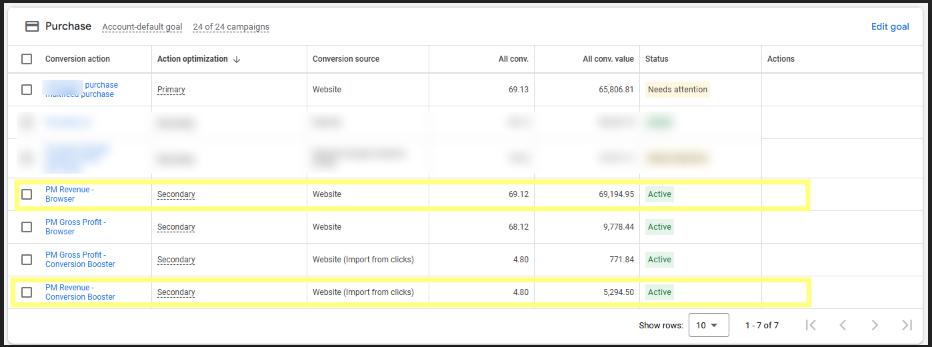
You can now see a significant change in reported revenue, being reported from the two new conversions ("PM Revenue - Browser" + "PM Revenue - Conversion Booster")
Before: $65,806.81
After: $74,489.45
That's $8,682.65 in revenue that would've been missed with the previous conversion tracking setup. A simple solution that allowed us to track 13.1% more revenue... and we implemented this in less than 24 hours.
On top of that, we can now also see profit tracked directly on our Google Ads dashboard.
And these were results only two weeks after our fix. Can you imagine how much more revenue we'll track by the end of a year? Crazy.
Note: we used ProfitMetrics.io for this setup, and it is a tool we highly recommend (not affiliated). There are other ways you can track more conversions without these tools; we'll write more about them in a future post.
Wrapping It Up...
Having a basic Google Ads tracking setup just doesn't cut it, anymore.
About 70% of the brands we audit are missing out on 15-20% of sales and/or revenue from being reported. And the solution is a lot easier than most would think.
Make sure you have:
Primary conversions via GACT (not GA4)
Server-side tracking enabled.
Enhanced conversions enabled.
Conversions with cart data.
New customer variable data.
Offline conversion imports.
And it's not just about missing out on reported revenue. Most importantly, it's about sending more data to Google.
More data means more signals for Google's machine learning to work with...
Which ultimately will mean better results for you. Clean signals are one of the keys nowadays to having success with Google Ads.
And conversion tracking is right at the foundation of it all.
Your Turn
How confident are you in your conversion tracking right now — 100%, 80%, or “honestly, no idea”?
When You’re Ready
Free Google Ads Audit → If your eCom brand does $50k+/mo, I’ll personally review your account and send you a step-by-step list on how to fix your account.
Google Ads Audit Checklist → Download your free checklist, pinned on my X bio.
Follow me on X → I share daily insights on scaling with Google Ads: @almeidalexandr